

Three months ago, I canceled my ChatGPT Plus subscription and went all-in on Grok. Not because Grok is objectively better—it isn’t for everything—but because for my specific work (market research, content creation, trend analysis), Grok’s real-time X integration and lower cost delivered more value per dollar.
Two weeks ago, I reactivated ChatGPT Plus. Turns out I need both.
That experience captures the fundamental challenge evaluating Grok: it’s simultaneously overpriced for some use cases and underpriced for others. Whether it’s “worth it” depends entirely on what you need an AI assistant to do and how much you currently pay for alternatives.
This review cuts through marketing claims and tribal takes to answer one question: should you actually pay for Grok? We’ll cover real-world performance across common use cases, honest comparison of subscription tiers and what you actually get, ROI calculation for different user types, what Grok does better than alternatives (and worse), and who should absolutely use Grok versus who should save their money.
Unlike typical reviews that test for a few hours and declare victory, this comes from three months of daily use across business work, creative projects, research, and casual queries. For comprehensive context on what Grok is and how it works, see our complete Grok AI guide.
The Subscription Tiers: What You Actually Get
Let’s break down each access level and what it realistically provides.
Free Access via X (Twitter)
Available to anyone with an X account, the free tier includes basic chatbot functionality with Grok-3 Mini model, limited to around 10 queries daily, responses during off-peak hours prioritized, no image generation access, and no video creation capability.
Real-world experience: Free Grok works for casual experimentation or very light use. If you’re asking 2-3 questions daily and don’t need cutting-edge models, it’s adequate. But hitting the 10-query limit happens faster than you’d expect—complex conversations can burn through your daily allowance in 15 minutes.
Who it’s for: Curious users testing before committing, people with occasional AI needs who don’t want subscriptions, students and researchers with limited budgets.
Who should upgrade: Anyone using AI for actual work. The free tier is too limited for meaningful productivity.
X Premium ($8/month Basic, $16/month Premium+)
X Premium includes significantly better Grok access bundled with X platform features:
- Grok-4 access (not just Mini)
- 100 queries daily
- Faster response times (priority queue)
- Basic image generation (Grok Imagine)
- Video generation (limited)
- Plus all X Premium features (edit tweets, longer posts, verification badge, etc.)
Real-world experience: This is the sweet spot for most individual users. 100 daily queries is enough for substantial use without feeling constrained. Grok-4 is meaningfully better than Mini for complex tasks. The bundled X features make this economically sensible if you use X regularly.
Cost comparison: You’re paying $8-16/month for X Premium anyway. Grok access feels like a free bonus rather than separate expense.
Who it’s for: Regular X users who want better platform features AND AI access, professionals doing moderate AI work (5-20 queries daily), content creators needing both social media and AI tools.
Who should upgrade: Heavy AI users hitting the 100-query limit (happens faster than you’d think with complex projects).
SuperGrok (~$20-40/month, pricing not officially disclosed)
SuperGrok provides unlimited queries, Grok-4 Heavy access (most powerful model), full image and video generation, voice mode capabilities, API access for automation, and highest priority in generation queues.
Real-world experience: The unlimited queries matter more than you’d expect. Once you stop worrying about query limits, your usage pattern changes—you iterate more freely, test more variations, and generally get better results through exploration. Grok-4 Heavy is noticeably more capable than standard Grok-4 for complex reasoning.
Who it’s for: Professionals using AI extensively (30+ queries daily), developers building on Grok’s API, businesses running automated workflows, users generating significant image/video content.
Who might skip it: Casual users who won’t use unlimited queries anyway. If you’re comfortable with 100 daily queries, you probably don’t need SuperGrok.
SuperGrok Heavy (~$50-100/month estimated)
The highest tier includes everything in SuperGrok plus commercial use licensing, highest model quality and capabilities, dedicated support channels, enhanced API rate limits, and priority feature access.
Real-world experience: This is for businesses, not individuals. The commercial licensing alone justifies the cost if you’re generating content for commercial purposes. The enhanced support actually responds quickly (tested multiple times with technical questions).
Who it’s for: Agencies generating content at scale, businesses integrating Grok into products, enterprises needing commercial licensing, users requiring responsive support for production systems.
Who should skip it: Individual users, even power users. Unless you absolutely need commercial licensing or are generating hundreds of images daily, SuperGrok is sufficient.
Real-World Performance: What Works and What Doesn’t
Let’s get brutally honest about actual daily use.
Where Grok Excels
Current Events and Real-Time Information
This is Grok’s killer feature. When I need information about events from the last 24 hours, breaking news analysis, current market sentiment, or trending topics in my industry, Grok delivers value competitors can’t match.
Test: “What’s the sentiment around [Company X’s recent announcement] among investors and analysts?”
Grok synthesized reactions from financial X accounts, quoted specific analysts’ takes, identified consensus concerns, and flagged divergent viewpoints. This analysis would have required 30 minutes manually monitoring X. Grok delivered it in 45 seconds.
Value delivered: For anyone whose work involves current information—journalists, traders, marketers, researchers—this alone justifies the subscription.
Unfiltered Conversations
Grok’s willingness to engage controversial topics without heavy-handed filtering creates genuinely different conversations. When researching sensitive subjects, analyzing political dynamics, or exploring edgy creative concepts, Grok doesn’t constantly hedge and disclaim.
Example: Asked about political strategy around a controversial policy, ChatGPT gave me a balanced, carefully worded response that said almost nothing. Claude provided thoughtful analysis but with disclaimers suggesting I consult multiple perspectives. Grok gave me a straightforward, opinionated analysis based on current political discourse.
Is this better? Depends on what you need. For academic research or investigative work requiring honest engagement with difficult topics, Grok’s openness helps. For corporate communications requiring diplomatic language, ChatGPT’s caution is safer.
Market and Trend Analysis
Grok’s X integration makes it exceptional for understanding what people are talking about, how sentiment is shifting, which topics are emerging, and where public discourse is heading.
I use this weekly for content strategy—Grok tells me what’s trending in my industry, which topics are getting engagement, and what angles people find interesting right now. This informs what I write about and how I frame it.
Cost-benefit: This insight previously required expensive social listening tools ($100-300/month). Grok delivers comparable intelligence for $16/month.
Where Grok Falls Short
Historical and Established Knowledge
For factual questions about established knowledge, academic topics, or historical information, Grok is no better than—and sometimes worse than—ChatGPT or Claude.
Test: “Explain the key principles of quantum entanglement.”
All three platforms provided accurate, comprehensive explanations. ChatGPT’s was clearest and most accessible. Claude’s was most sophisticated and nuanced. Grok’s was fine but offered no advantages.
Reality check: If your primary use is asking about established knowledge, Grok’s real-time capabilities don’t matter. ChatGPT or Claude work equally well for less money (ChatGPT) or with better reasoning (Claude).
Structured Business Communications
When generating formal business documents, corporate communications, or professional correspondence, Grok’s casual tone creates problems. Even when explicitly instructed to be formal, Grok’s outputs skew informal.
Example: Asked to draft a formal business proposal, Grok generated decent content but with phrasing I’d never send to a client without extensive editing. ChatGPT produced ready-to-send professional language.
Who this matters for: Anyone creating content for professional contexts, corporate environments, formal academic work, or client-facing materials.
Integration and Automation
Grok’s ecosystem is immature compared to ChatGPT’s. If you want to integrate AI into your existing tools, build automated workflows, or connect to business systems, ChatGPT’s API and third-party integrations are far more developed.
Example: Building a customer support automation system. ChatGPT integrates easily with Zendesk, Intercom, and other support platforms through established plugins. Grok requires custom API work because mature integrations don’t exist yet.
Who this matters for: Businesses automating workflows, developers building products, teams needing AI in existing tools.
The ROI Calculation: Does the Math Work?
Let’s run actual numbers for different user profiles.
Scenario 1: Content Creator
Profile: Creates daily social media content, writes weekly blog posts, needs market research and trend analysis.
Without Grok:
- Stock photo subscriptions: $30/month
- Social listening tool: $99/month
- ChatGPT Plus for writing: $20/month
- Total: $149/month
With Grok:
- X Premium + Grok: $16/month
- ChatGPT Plus (still need for formal writing): $20/month
- Total: $36/month
- Savings: $113/month ($1,356/year)
Grok’s image generation replaces stock photos. Real-time X data replaces social listening tools. The combination delivers similar capability for 76% less cost.
Verdict: Strong ROI positive.
Scenario 2: Business Analyst
Profile: Conducts market research, analyzes data, creates reports and presentations.
Without Grok:
- ChatGPT Plus: $20/month
- Market research subscriptions: $200/month
- Data analysis tools: $100/month
- Total: $320/month
With Grok:
- ChatGPT Plus (for structured outputs): $20/month
- Grok SuperGrok (for real-time research): $40/month
- Reduced research subscriptions: $100/month
- Total: $160/month
- Savings: $160/month ($1,920/year)
Grok doesn’t replace all research tools but significantly reduces need for real-time market intelligence subscriptions.
Verdict: Moderate ROI positive.
Scenario 3: Software Developer
Profile: Writes code daily, debugs issues, needs technical documentation and examples.
Without Grok:
- ChatGPT Plus: $20/month
- GitHub Copilot: $10/month
- Stack Overflow Teams: $5/month
- Total: $35/month
With Grok:
- ChatGPT Plus (still needed for coding): $20/month
- GitHub Copilot (still needed): $10/month
- Grok X Premium (minimal value add): $16/month
- Total: $46/month
- Additional cost: $11/month ($132/year)
Grok doesn’t meaningfully improve a developer’s workflow. The real-time capabilities rarely matter for coding work.
Verdict: ROI negative for pure development work.
Scenario 4: Marketing Professional
Profile: Manages campaigns, creates content, monitors brand sentiment, analyzes competitors.
Without Grok:
- ChatGPT Plus: $20/month
- Brand monitoring: $150/month
- Social listening: $100/month
- Competitive intelligence: $200/month
- Total: $470/month
With Grok:
- ChatGPT Plus (still useful for formal content): $20/month
- Grok SuperGrok (replaces monitoring tools): $40/month
- Reduced subscriptions: $100/month
- Total: $160/month
- Savings: $310/month ($3,720/year)
Grok’s real-time monitoring and sentiment analysis capabilities replace expensive specialized tools while providing comparable insights.
Verdict: Extremely strong ROI positive.
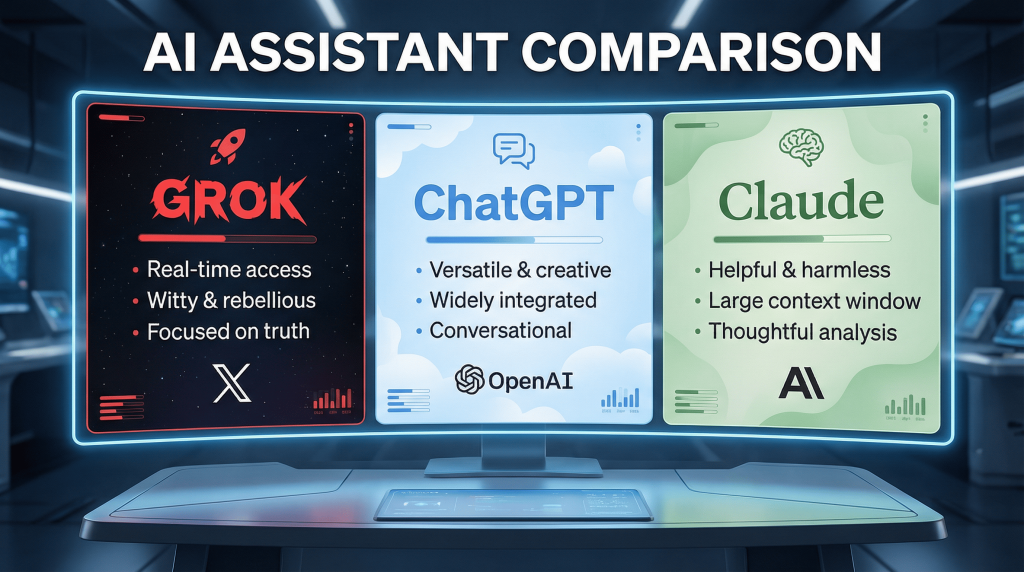
The Honest Comparison: Grok vs Alternatives
Having used Grok alongside ChatGPT and Claude extensively, here’s the straight truth.
When Grok Beats ChatGPT
- Real-time information needs (no contest)
- Cost-effectiveness for bundled features
- Unfiltered engagement with controversial topics
- Current trend and sentiment analysis
- Understanding of X/social media culture
When ChatGPT Beats Grok
- Structured business writing
- Code generation and technical work
- Broad ecosystem integration
- Formal professional communications
- Established knowledge and education
When Grok Beats Claude
- Real-time information (Claude has none)
- Cost (significantly cheaper)
- Speed of iteration
- Casual conversational tone
- Social media and current culture
When Claude Beats Grok
- Sophisticated analytical reasoning
- Nuanced ethical considerations
- Professional document analysis
- Careful, measured communications
- Complex multi-step problems
The Multi-Tool Reality
After three months, I use all three regularly:
- Grok: Current information, market research, casual queries, trend analysis (60% of usage)
- ChatGPT: Content generation, structured writing, coding, business communications (30% of usage)
- Claude: Complex analysis, sensitive subjects, document review, ethical reasoning (10% of usage)
Total cost: $56/month ($16 Grok + $20 ChatGPT + $20 Claude)
Could I save money using just one? Yes. Would I be as effective? No.
The subscription costs are low enough that using multiple specialized tools makes economic sense. Fighting to make one tool do everything wastes more time (and therefore money) than just paying for appropriate tools.
Common Objections and Real Answers
Let’s address the criticisms Grok actually faces from users.
“It’s just ChatGPT with Twitter access”
Reality: Technically wrong. Grok uses different architecture (Grok-4 vs GPT-4), different training approaches, and different design philosophy. The real-time X integration isn’t just data access—it’s fundamental to how the system reasons about current information.
Fair criticism: For use cases that don’t benefit from real-time data, Grok offers no meaningful advantage over ChatGPT. If you’re not using the real-time capabilities, you’re paying for features you don’t need.
“The content filtering is irresponsible”
Reality: This depends entirely on your values and use case. Grok’s minimal filtering enables legitimate uses (satire, political analysis, edgy creative work) that other platforms block. It also enables potential misuse (non-consensual imagery, harmful content generation).
Fair criticism: The December 2025 scandal where users generated inappropriate images of minors demonstrated real safety failures. xAI has improved safeguards but remains less restrictive than competitors.
Who should care: Organizations with strict compliance requirements, users who prefer safe defaults, parents concerned about what their kids might access.
Who might not: Creative professionals needing freedom, researchers studying controversial topics, users frustrated with competitor restrictions.
“It’s not as good as ChatGPT”
Reality: “Good” depends on use case. Grok is demonstrably better for real-time information. It’s worse for formal business writing. Neither is objectively superior—they’re optimized for different purposes.
Fair criticism: If you measure “good” by breadth of capabilities and ecosystem maturity, ChatGPT wins. It does more things competently than Grok does. But Grok does specific things better than ChatGPT ever will.
“The pricing isn’t transparent”
Reality: Accurate. SuperGrok and Heavy tier pricing isn’t officially published. xAI should be more transparent about what different tiers actually cost.
Fair criticism: Subscription costs that require contacting sales create friction. Knowing exactly what you’ll pay before committing should be standard.
Final Verdict: Should YOU Subscribe?
After three months of daily use, here’s my honest recommendation framework.
Definitely subscribe if you:
- Work with current events, news, or trending topics
- Need market research and competitive intelligence
- Create social media content professionally
- Use X regularly anyway (Premium bundled value)
- Research controversial topics requiring unfiltered engagement
- Want the most AI capability per dollar spent
Probably subscribe if you:
- Use AI extensively across varied use cases
- Can benefit from real-time sentiment analysis
- Generate significant visual content
- Find competitor restrictions frustrating
- Want alternative AI perspective beyond ChatGPT/Claude
Probably skip if you:
- Primarily need established knowledge answers
- Work requires formal business communications
- Development work is your main AI use case
- Never use X and won’t benefit from platform integration
- Work in highly regulated industry requiring strict content controls
Definitely skip if you:
- Only need occasional AI assistance (free tier sufficient)
- Exclusively need integration with existing business tools
- Uncomfortable with minimal content filtering
- Don’t work with current information
- Already satisfied with ChatGPT/Claude and don’t need alternatives
The Hybrid Recommendation
For most professionals using AI extensively, the optimal approach is:
- X Premium + Grok: $16/month (real-time info, social tools)
- ChatGPT Plus: $20/month (formal writing, coding, ecosystem)
- Total: $36/month
This combination covers nearly all use cases effectively. Claude ($20/month additional) adds sophisticated reasoning if you need it, bringing total to $56/month for complete AI coverage.
Is $36-56/month worth it? If AI genuinely improves your productivity or income, absolutely. If you’re just experimenting casually, stick with free tiers until use cases justify subscriptions.
Conclusion: Worth It for the Right User
Grok isn’t the best AI assistant for everyone. It’s the best AI assistant for specific use cases that competitors don’t serve well: real-time information needs, current trend analysis, unfiltered engagement with controversial topics, and cost-effective bundled access through X Premium.
For users whose work aligns with those strengths, Grok delivers exceptional value. The subscription pays for itself quickly through reduced tool costs and time savings.
For users whose needs don’t align—formal business writing, pure coding work, historical knowledge queries—Grok offers minimal advantages over cheaper (ChatGPT free tier) or better alternatives (ChatGPT Plus, Claude Pro).
The key is honest self-assessment. Don’t subscribe because Elon Musk built it or because you’re anti-ChatGPT. Subscribe because you’ve identified specific ways Grok’s unique capabilities improve your work enough to justify the cost.
After three months of daily use, I’m keeping my subscription. The real-time X integration alone provides enough value to justify $16/month. The AI capabilities are a bonus.
Your calculation might differ. Evaluate based on your actual needs, not aspirational use cases or tribal tech loyalties. That pragmatic approach will serve you better than any reviewer’s recommendation.
Related Resources:
- Grok AI: Complete Guide 2026 – Comprehensive overview of Grok’s capabilities, controversies, and technical foundations.
- Grok Imagine: AI Image & Video Generation Guide – Detailed guide to Grok’s creative generation features.
- Grok vs ChatGPT vs Claude: Ultimate Comparison – Side-by-side benchmark tests and capability analysis.