How to Build a Content Automation Workflow from Scratch
Content production is the thing that quietly eats your business alive. One article requires research, writing, editing, images, publishing, and promotion. Multiply that by ten articles a month and you’ve just spent an entire week doing nothing but content — every single month, without fail.
I lived in that cycle for a long time. Write, publish, promote, repeat. Until I decided to build a system that handles most of it without me.
The result? Content that used to take days now takes hours. The time I actually spend on it now is thinking and reviewing — not manual writing, formatting, scheduling, and posting across five different platforms.
Why Most Content Automation Attempts Fail
The most common reason is that people try to automate the writing entirely. They ask AI to produce a full article and publish it automatically with zero human involvement. The output is content that reads exactly like what it is — generated, voiceless, generic, with no real experience behind it.
Successful content automation doesn’t mean removing the human from the equation. It means removing the mechanical, repetitive tasks and keeping the creative decisions where they belong — with you.
The system handles the structure, the formatting, the scheduling, and the distribution. You handle the thinking, the voice, and the judgment calls. That division is what makes the difference between content that builds an audience and content that fills a page.
What Can Actually Be Automated in a Content Operation
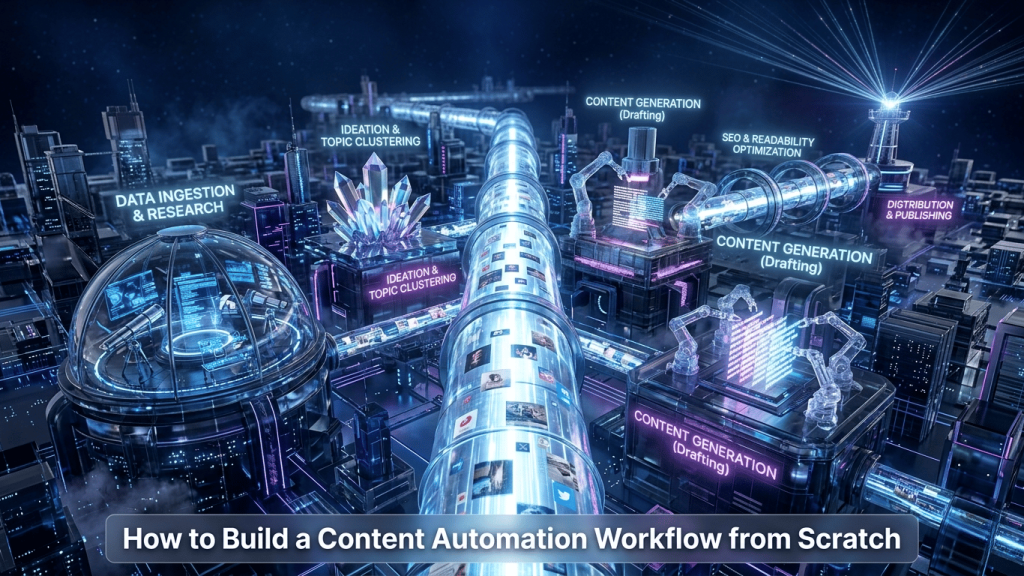
Content production moves through stages. Some stages require real creative thinking — those stay with you. Others are mechanical and repeatable — those go to the system.
The first stage is topic research. Instead of spending hours manually digging through search data to find what people are actually looking for, an automated system can pull data from multiple sources, identify trending topics in your niche, and deliver a prioritized list to you every week. You make the final call on what to cover — the system does the legwork.
The second stage is the brief and structure. Once you’ve chosen a topic, AI builds the full article outline — headings, key points, questions to answer, angle to take. You review and adjust. But the skeleton is already there, which turns a blank page into a starting point.
The third stage is the first draft. Claude or GPT-4o writes the draft based on the approved outline. You go through it, add your personal voice, your real experiences, your specific insights — and cut anything that doesn’t belong. The draft isn’t the article. It’s the raw material you shape into one.
The fourth stage is formatting and publishing. After you approve the content, an automated workflow takes it, places it in WordPress with the correct structure, adds images, fills in the SEO fields, and schedules it for the right time. You never touch the backend manually.
The fifth stage is promotion. Immediately after publishing, platform-specific posts go out automatically to every social channel — each one formatted for that platform’s audience and tone.
How to Build the System, Step by Step
The first step is mapping your current process. Before touching any tool, draw out on paper every step you go through from content idea to published article. That drawing is the blueprint for the system you’re about to build. Skip this and you’ll automate the wrong things.
The second step is identifying your decision points. In every content operation, there are moments that require a human judgment call — choosing the final topic, approving the outline, reviewing the draft before it goes live. These stay manual. Everything between those decision points is fair game for automation.
The third step is selecting your tools. Make is the backbone that connects everything. For the AI layer, Claude and GPT-4o handle the writing and structuring tasks differently — Claude tends to produce more structured, nuanced output while GPT-4o moves faster on first drafts. For scheduling, Buffer or Notion work well. For publishing, Make integrates directly with the WordPress API. If you’re still deciding between Make and Zapier for this setup, the detailed comparison is in Make vs Zapier: Which Automation Tool is Actually Worth It in 2026.
The fourth step is building the simplest version first. Don’t try to automate the entire pipeline on day one. Start with one stage — formatting and publishing is the easiest entry point because it requires no creative judgment. Get that running, then add the stage before it, then the stage before that.
The fifth step is measuring and improving. After a month of running the system, look at where time is still being lost. That’s your next automation target. Every serious content system I’ve seen was built incrementally — nobody built the full pipeline in a week.
What This Looks Like When It’s Running
The best way to understand what a complete content automation system actually produces is to see one in operation. I documented the full build — tools, workflow logic, and real results — in How We Built a Self-Operating Content Engine for a Digital Agency. The numbers from the first thirty days are worth reading before you build your own.
The difference this kind of system makes isn’t only about saved time — it’s about consistency. A well-built content workflow publishes on schedule whether you’re busy, sick, traveling, or focused on something else entirely. And consistency in publishing is one of the highest-leverage factors in growing an audience and ranking in search. Google rewards websites that publish regularly and predictably far more than sites that publish brilliantly but sporadically.
For a broader view of how content automation fits into a fully automated business operation, the complete picture is in The Complete Guide to AI Automation and Workflows in 2026.
Once your content system is running, the next high-leverage automation is your data and reporting. I covered that in detail in How to Automate Your Data and Reporting with AI.
And if you’re starting from zero and want to build your first simple workflow before tackling a full content pipeline, the right starting point is The Beginner’s First Workflow: From Zero to Automated in One Day.
For connecting AI models directly into your workflow stack, the technical setup is in How to Connect Claude and GPT-4o to Your Business Workflow.
FAQ
Does automating content hurt quality? Only if you automate the wrong parts. Automating mechanical tasks — formatting, scheduling, distribution — has zero impact on quality. Automating the thinking and voice is where quality suffers. Keep the creative decisions human and let the system handle everything else.
What’s the minimum tool stack to build this system? Make for the connections, Claude or GPT-4o for writing assistance, and Notion or Google Sheets to manage your topic queue. WordPress as the publishing destination. Everything else is optional and can be added as your needs grow.
How long does it take to build a content automation workflow? A basic version — covering formatting and publishing — takes two to three days. A complete pipeline from research to promotion takes two to three weeks of incremental building and testing.
Can I build this with no budget? Yes. Make’s free plan, Claude’s free tier, and WordPress together give you a functional content automation system at zero cost. You invest in paid plans when the volume justifies it.
Does this work for all content types? It works exceptionally well for articles, social posts, and newsletters. Content that requires deep personal expertise — original case studies, firsthand research, proprietary data — will always need more human involvement. The system supports that work; it doesn’t replace it.
Map your current content process this week. Every step, on paper. That map is your automation roadmap. Start there.