

Writing effective prompts is like learning the language of AI. In simple terms, an AI prompt is the text you give to a generative model (like ChatGPT, Claude, or Google’s Gemini) to tell it what to do. Think of it as the instructions or questions you type in – a command, a question, or some background information. The prompt is the fuel for the AI: the clearer and more detailed it is, the better the AI’s answer will be. For example, telling an AI “Write a marketing email” will yield a generic template, but specifying “You are an expert marketer writing a 150-word cold email to tech startup founders about our AI analytics tool” provides context, tone, and purpose – resulting in a far more useful response.
Why AI Prompts Quality Matters
Poorly defined prompts often yield bad answers. As one expert guide notes, “if an AI prompt is poorly defined, the LLM output might be vague, misleading, off topic, inaccurate or biased”. In practice, a vague prompt produces a generic answer that wastes your time; a great prompt produces precise, actionable content. Well-crafted prompts can dramatically boost efficiency – saving hours of trial-and-error. In fact, users report that spending just a bit more time on prompt wording can multiply the quality of results. In today’s market, prompt engineering is a valuable skill: organizations pay top dollar for people who can communicate effectively with AI. Prompt engineers often earn six-figure salaries (median ~$126K in the US as of 2025), reflecting high demand for this expertise.
How to Write an Effective Prompt
The key is to structure your ai prompts clearly. Experts suggest a modular approach: assign a role/persona, state the task, give context, and specify output requirements. In practice, you might do this with a simple framework:
- Role/Persona: Tell the AI who it is. (E.g. “You are an experienced marketing consultant” or “Act as a financial analyst.”)
- Task/Action: Describe exactly what you want it to do. (E.g. “Draft a product launch email” or “Analyze the following data.”)
- Context/Background: Provide relevant details, background information or constraints. (E.g. “For a B2B SaaS startup targeting small businesses” or “Assume the reader has no technical background.”)
- Examples (Optional): If relevant, show one or two examples of the style or format you want.
- Output Specifications: Define format, length, tone, or any other requirements. (E.g. “3 bullet points, professional tone, max 100 words”)
Using this structure helps prevent logical drift and makes your intent clear. For instance, a good prompt might say: “Role: You are a friendly tech blogger. Task: Write a 300-word introduction on how AI can boost remote work productivity. Context: The readers are non-technical entrepreneurs. Format: Include 2 bullet points of key benefits, use a casual tone.” This gives the AI direction on voice, content, and format all at once.
Tips: Always be as specific and detailed as necessary. Ambiguous prompts lead to “vague or unhelpful responses”. Specify the output format (list, table, essay, code, etc.) and any length or style constraints. Also, iterate and test: try different phrasings and adjust based on the AI’s response. Small tweaks can dramatically improve the outcome.
Common Prompt Styles

Prompts can take many forms depending on your goal. Some widely used types include:
- Instruction Prompt: Direct commands. “Write a Twitter thread about AI in healthcare.”
- Question Prompt: Open-ended queries. “What are the benefits of AI for small businesses?”
- Role-Play Prompt: Assign a persona. “You are an SEO expert. Evaluate this blog post and suggest improvements.”
- Few-Shot Prompt: Provide examples and ask for similar output. “Here are 2 examples of good ad headlines: [examples]. Write 5 new headlines in the same style.”
- Chain-of-Thought Prompt: Ask the AI to reason step by step. “Explain how to solve this problem, thinking out loud before giving the answer.”
- Transformation Prompt: Instruct the AI to rewrite or format existing content. “Rewrite the following paragraph as a LinkedIn post in a professional tone.”
Each style leverages the AI’s capabilities differently. For instance, few-shot prompts (with examples) help calibrate style, and chain-of-thought prompts coax the model to do internal reasoning before answering, often improving accuracy. Experiment with different prompt types to see what works best for your task.
Examples by Use Case
Below are sample prompts tailored to common scenarios. You can adapt these to your needs:
- Marketing & Content:
- “Write a 200-word LinkedIn post about [topic] with a strong hook, 3 actionable tips, and a closing question. Tone: authentic and engaging.”
- “Plan a 4-week content calendar for our AI startup’s blog. List 3 post ideas per week with titles, formats (e.g. list, guide, case study), and target keywords.”
- “Draft a 300-word newsletter on the latest AI trend, including a catchy intro, 3 key news items, and a call-to-action.”
- Productivity & Planning:
- “Here are meeting notes: [paste notes]. Summarize them into decisions made, action items (with owners), and open questions.”
- “Create a detailed project plan for launching a new product in 8 weeks. Include phases, major tasks, deadlines, and resource needs.”
- “Write 5 email templates for customer follow-ups. Each should have a catchy subject, a 2-paragraph body, and a clear CTA.”
- Coding & Data:
- “Write a Python function that filters a list of customer emails by domain and returns the result. Include docstring and handle errors.”
- “Analyze this sales dataset [insert data]. List the top 3 trends with percentages and suggest one strategy for each.”
- Human Resources:
- “Write a job posting for a ‘Marketing Manager’ at TechCo. Tone: inclusive. Include 5 key responsibilities, 5 required skills, and list the benefits.”
- “Generate 10 behavioral interview questions (using the STAR method) to assess a candidate’s problem-solving skills.”
Each prompt above includes context (audience, purpose), a clear task, and often a desired format. Adjust details like company/product names and goals to fit your situation.
Tailoring Prompts to Different AI Tools

Different AI models may respond best to slightly different prompt styles:
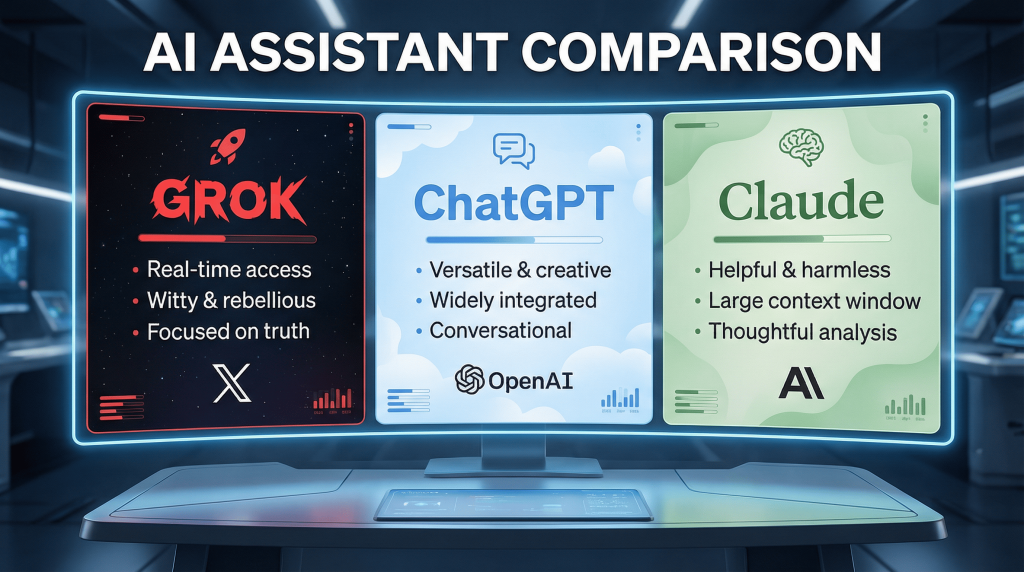
- ChatGPT (OpenAI): Works well with clear, conversational instructions. Specify the role, tone, and format. For example:
“You are an expert developer. Explain how the following code works: [code]. Provide comments in simple terms.” - Claude (Anthropic): Known for detailed, thoughtful answers. It often benefits from very structured prompts (even XML-style tags). For example:
<task>Review this proposal</task><detail>Identify 3 strengths and 2 weaknesses of the strategy described below.</detail> - Gemini (Google): Excels at factual research and data-driven tasks. It integrates well with Google tools. For instance:
“Find the 5 most recent studies on the impact of AI on employment. For each study, give title, date, key finding, and link.”
Gemini also shines when given data to analyze (e.g. spreadsheets) or when asked complex research questions. - Image Models (Midjourney, DALL-E, Stable Diffusion): For image AI, prompts look different. You typically specify subject + style + mood + details. Example:
“A minimalist vector logo for a startup named ‘Aiwiner’, color palette blue and white, modern and clean design.”
Or “Portrait of a female entrepreneur in a modern office, photorealistic, natural lighting, 4K”. Details like aspect ratio flags or stylistic descriptors (photorealistic, cinematic, cartoon) guide the image output.
Always check each model’s documentation, as the optimal prompt format can vary.
Common Mistakes to Avoid
- Too Vague or Short: Avoid prompts like “Tell me about marketing.” Instead, be specific. E.g. “List 5 digital marketing strategies for a B2B startup, each in one sentence.”.
- No Context or Role: If you skip context, the AI has to guess your needs. Always mention relevant details (industry, audience, goal).
- No Output Format: If you don’t specify, the AI may give a wall of text. Tell it if you need bullets, a table, code, etc. For example: “Answer as bullet points” or “Return JSON format.”
- Ignoring Tone or Style: Say whether the tone should be professional, friendly, technical, or casual. The difference is huge.
- Not Iterating: Don’t expect the first prompt to be perfect. Refine it if the answer isn’t right. Try asking for revisions, or tweak your instructions and run it again.
- Overloading Everything at Once: It’s often better to start with a simpler prompt and then build. Multi-step or chained prompts (ask the AI to do subtasks sequentially) can help manage complexity.
Remember: well-crafted prompts yield better outputs. Before finalizing anything critical, consider asking the AI for alternatives or improvements to its answer.
Tools and Resources
To improve your prompting skills and find inspiration, check out prompt libraries and communities. Sites like PromptBase and FlowGPT host thousands of prompt templates you can adapt. GitHub also has open-source collections (e.g. Awesome ChatGPT Prompts). There are even prompt-optimization tools (like PromptPerfect) and frameworks (LangChain, LlamaIndex) that help automate and refine multi-step workflows.
Conclusion: Prompts as Your Superpower
In 2026, mastering prompts is a genuine competitive advantage. The better you can communicate with AI, the more you can delegate to it – from drafting content to analyzing data or even coding. Good prompts are precise, contextualized, and well-structured. They often include who the AI is (the role), what it should do (the task), relevant details, and the desired output format or style. With practice, you’ll learn to phrase prompts that consistently get you the answers you need.
By thinking like a prompt engineer – experimenting with phrasing, providing clear examples, and refining your requests – you turn AI into an invaluable assistant. Use the guidelines and examples above as a starting point. Adapt them to your own projects, and iteratively improve. Before long, writing effective prompts will feel as natural as talking to a colleague, and the AI’s responses will be that much sharper.
Sources: Definitions and best practices from TechTarget and University AI guides; prompting frameworks from Coursera and educational resources; advice on model differences from Aiseful’s prompt guide. These resources informed the examples and tips above.