Zapier AI review 2026 — Zapier was already the world’s most popular no-code automation platform. In 2026, it has gone all-in on AI: AI-powered Zap builder, AI steps inside workflows, a conversational Copilot, and deep integrations with ChatGPT, Claude, and Gemini. We tested every AI feature to give you the complete picture.
What’s New: Zapier AI Features in 2026
Zapier has transformed from a “if this, then that” connector into a genuine AI automation platform. The key additions:
- Zapier Copilot — Describe your automation in plain English, Copilot builds the Zap for you
- AI Step — Add an AI action inside any Zap: summarize, classify, translate, extract, or generate content using GPT-4o, Claude, or Gemini
- Zapier Agents — Autonomous AI agents that monitor triggers and take multi-step actions without fixed workflows
- AI by Zapier — A built-in AI action that doesn’t require an OpenAI account — just write your prompt and Zapier handles the API call
- Tables + Interfaces — Built-in database and UI builder, now AI-assisted
Zapier Pricing 2026
| Plan | Price/month | Tasks/month | AI Features |
|---|---|---|---|
| Free | $0 | 100 | Basic AI Step (limited) |
| Starter | $19.99 | 750 | AI Step, Copilot |
| Professional | $49 | 2,000 | All AI features, multi-step Zaps |
| Team | $69 | 2,000 | Shared workspace, Zapier Agents |
| Company | Custom | Unlimited | SSO, custom data retention, SLA |
Zapier Copilot: Build Automations in Plain English
Zapier Copilot is the standout AI feature. Instead of manually selecting triggers and actions, you type what you want: “When a new lead fills out my Typeform, add them to HubSpot, send a welcome email via Gmail, and post a Slack notification to my sales channel.” Copilot builds the full multi-step Zap — correctly — in under 30 seconds.
In our testing, Copilot handled 80% of common automation requests perfectly on the first try. The remaining 20% needed minor adjustments — usually around field mapping for uncommon apps. Compared to building Zaps manually, it saves 10-20 minutes per automation.
AI Step: The Game-Changer for Smart Workflows
The AI Step action lets you inject AI processing at any point in a Zap. Real examples of what this enables:
- Email triage — New email arrives → AI Step classifies it (support/sales/spam) → routes to the right folder/person
- Lead scoring — New CRM entry → AI Step scores lead quality based on company size, role, and message → tags in HubSpot
- Content repurposing — New blog post published → AI Step rewrites as LinkedIn post → posts automatically
- Support summarization — New Zendesk ticket → AI Step summarizes issue and suggested solution → adds to ticket as internal note
- Invoice data extraction — PDF invoice received → AI Step extracts vendor, amount, date → creates row in Google Sheets
Zapier Agents: Autonomous AI Workflows
Zapier Agents is the newest and most ambitious feature. Unlike standard Zaps (fixed trigger → fixed action), Agents can reason about situations and take variable actions based on context. You give the Agent a goal, tools (apps it can use), and knowledge base — it decides how to accomplish the goal.
Example: an Agent that monitors your inbox, decides which emails need a response, drafts replies in your tone, checks your calendar before suggesting meeting times, and sends responses — all autonomously. This is genuinely powerful but still requires careful setup and testing before trusting it with critical tasks.
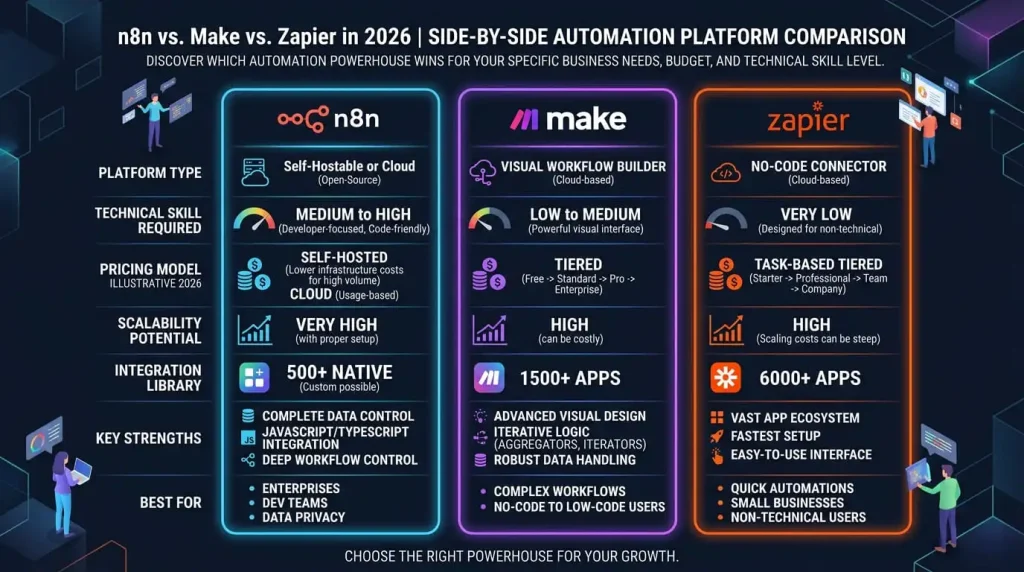
Zapier vs Make vs n8n: Which AI Automation Tool Wins?
| Criteria | Zapier | Make | n8n |
|---|---|---|---|
| Ease of use | ⭐⭐⭐⭐⭐ Easiest | ⭐⭐⭐⭐ Visual but steeper | ⭐⭐⭐ Requires tech knowledge |
| AI features (2026) | ⭐⭐⭐⭐⭐ Best built-in AI | ⭐⭐⭐⭐ Good via HTTP modules | ⭐⭐⭐⭐⭐ Most flexible via nodes |
| App integrations | ⭐⭐⭐⭐⭐ 7,000+ apps | ⭐⭐⭐⭐ 1,500+ apps | ⭐⭐⭐⭐ 400+ nodes + custom |
| Pricing (value) | ⭐⭐⭐ Expensive at scale | ⭐⭐⭐⭐⭐ Best value | ⭐⭐⭐⭐⭐ Free self-hosted |
| Automation complexity | ⭐⭐⭐⭐ Good multi-step | ⭐⭐⭐⭐⭐ Best for complex flows | ⭐⭐⭐⭐⭐ Maximum flexibility |
| AI Copilot / Builder | ⭐⭐⭐⭐⭐ Best | ⭐⭐⭐ Limited | ⭐⭐⭐ Basic AI assist |
For a full breakdown, see our Make vs Zapier 2026 comparison and our n8n vs Make vs Zapier 3-way comparison.
What Zapier AI Does Best in 2026
- ✅ Fastest path from idea to running automation — Copilot builds it, you review and activate
- ✅ Best app coverage — 7,000+ integrations means almost any tool you use is supported
- ✅ No-code AI steps — Add AI processing without an OpenAI account or API key (AI by Zapier handles it)
- ✅ Reliability — Zapier’s uptime and error handling are best-in-class. For business-critical automations, this matters.
- ✅ Support & documentation — Huge community, extensive tutorials, responsive support
Zapier AI Limitations
- ❌ Expensive at scale — Task-based pricing gets costly for high-volume workflows. Make or n8n are more cost-efficient above 10,000 tasks/month.
- ❌ Agents still in early stages — Powerful in theory, but requires careful testing. Not production-ready for high-stakes autonomous decisions.
- ❌ Less flexibility than n8n — If you need custom code, complex data transformations, or self-hosted infrastructure, n8n gives more control.
Who Should Use Zapier AI in 2026?
- ✅ Small business owners who want automation without technical setup
- ✅ Marketing and sales teams automating lead workflows, email sequences, CRM updates
- ✅ Agencies managing multiple client automations who need reliability and speed
- ✅ Non-technical users who want to add AI to their workflows without coding
- ❌ High-volume data pipelines → Use Make or n8n for better cost efficiency
- ❌ Developers wanting full control → n8n self-hosted is more powerful
Verdict: Is Zapier AI Worth It in 2026?
Yes — for most non-technical users and small-to-medium teams, Zapier remains the best AI automation platform in 2026. The Copilot and AI Step features genuinely reduce setup time by 50-70%. The 7,000+ app integrations and rock-solid reliability justify the premium price for business-critical workflows.
If you’re hitting the pricing ceiling or need complex data logic, switch to Make or n8n. But as an entry point into AI automation — and for most professional workflows — Zapier is hard to beat.
Frequently Asked Questions
Is Zapier AI free?
Zapier has a free plan with 100 tasks/month and basic AI features. The full AI Step and Copilot features require the Starter plan at $19.99/month or higher.
What AI models does Zapier use?
“AI by Zapier” uses OpenAI’s GPT-4o by default. You can also connect your own OpenAI, Anthropic, or Google API key to use specific models (GPT-4o, Claude 3.7, Gemini 2.0) in AI Steps.
Zapier vs Make: which is better for AI automation?
Zapier is easier to use and has better native AI features (Copilot, AI Step, Agents). Make offers better value at scale and more flexibility for complex data flows. For AI-first workflows without technical complexity, Zapier wins. For power users managing high-volume or complex logic, Make is more cost-effective.
Can Zapier replace a developer for AI automation?
For most business automation tasks — yes. Zapier Copilot and AI Steps cover 80%+ of common AI workflow needs without any code. For custom algorithms, complex data transformations, or on-premise deployment, developer involvement is still needed.
Tested: May 2026. Pricing verified against Zapier’s official documentation.