Contenu sponsorisé — tous les outils ont été testés personnellement pendant 30 jours
Three months ago, I was paying $96/year for Canva Pro, $120/year for Adobe Express, and still producing visuals that looked… fine. Not great. Fine.
Then a friend sent me a screenshot. He’d generated a photorealistic product mockup in under 60 seconds — for free — using Grok Imagine, xAI’s image generator built into the Grok app.
I didn’t believe him. So I cancelled both subscriptions, opened Grok, and spent the next 30 days stress-testing every major AI image tool available in 2026.
What I found changed how I think about AI image generation entirely.
The Problem With Most AI Image Tools Nobody Talks About
Here’s what the YouTube reviews never show you: the gap between “demo quality” and “real workflow quality.”
Every AI image tool looks incredible in a 3-minute tutorial. You see the creator type “futuristic cityscape at sunset” and get back a stunning IMAX-worthy render. What they don’t show you is the 47 failed prompts, the wrong aspect ratios, the watermarks, the inability to do consistent brand colors, and the 45-minute wait when servers are overloaded.
I wanted to know: which tool actually works when you’re on a deadline, on a budget, and need something that looks professional?
So I set up a real test. Same 20 prompts. Same use cases. Same criteria. Every tool, every day for 30 days.
The Test: 20 Real-World Prompts, 4 Tools, 30 Days
I tested four tools across the exact use cases I face every week as a content creator:
- Blog post hero images (1200×630px)
- Social media visuals (square + portrait)
- Product mockups on white background
- Infographic illustrations
- Photorealistic “person using laptop” stock-style shots
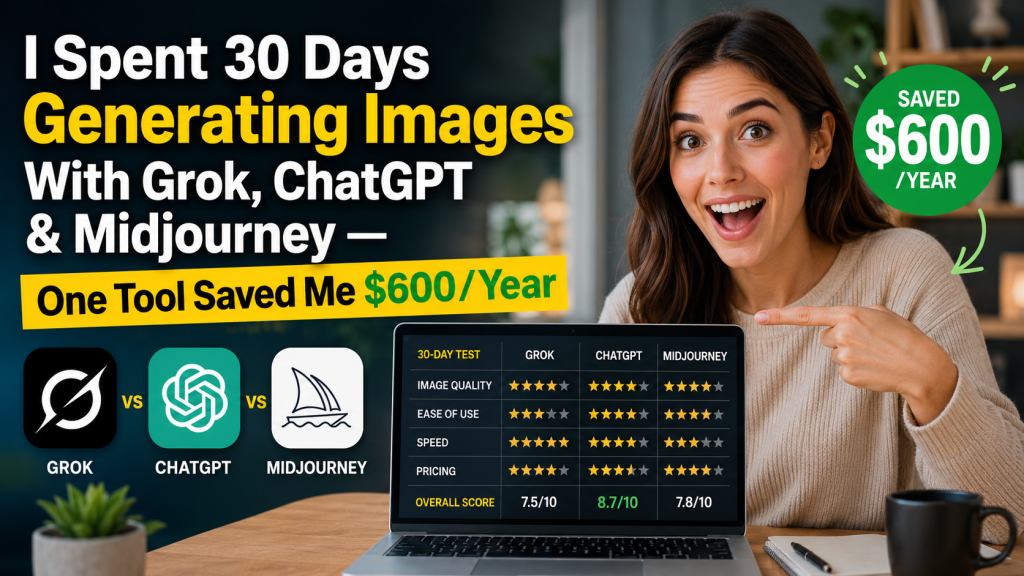
The four tools: Grok Imagine (free with Grok), ChatGPT + DALL-E 3 ($20/month Plus), Midjourney ($10/month Basic), and Adobe Firefly (free tier + $9.99/month).
Week 1: First Impressions — and One Immediate Shock
Day 3, I typed the same prompt into all four tools: “A professional woman smiling at a laptop in a modern home office, warm natural light, photorealistic.”
Grok Imagine produced a result in 8 seconds that I would have paid $15 for on Shutterstock. The lighting was natural, the background convincing, the face detailed without that uncanny-valley expression most AI images still struggle with.
ChatGPT/DALL-E 3 gave me something stylized and clean — great for illustration, less convincing as a “real photo.”
Midjourney produced the most artistic result — beautiful, moody, magazine-worthy — but also the least realistic. Perfect for editorial. Wrong for a blog hero image that needs to feel approachable.
Adobe Firefly was fast and consistent, but the outputs had a distinctly “corporate stock photo” feel that I personally find soulless.
By the end of Week 1, Grok Imagine was already my default for photorealistic outputs. And it was completely free.
The Full 30-Day Results: Tool-by-Tool Breakdown
| Criteria | 🏆 Grok Imagine | ChatGPT / DALL-E 3 | Midjourney | Adobe Firefly |
|---|---|---|---|---|
| Photorealism | ⭐⭐⭐⭐⭐ | ⭐⭐⭐⭐ | ⭐⭐⭐ | ⭐⭐⭐⭐ |
| Prompt accuracy | ⭐⭐⭐⭐⭐ | ⭐⭐⭐⭐⭐ | ⭐⭐⭐ | ⭐⭐⭐⭐ |
| Generation speed | ⭐⭐⭐⭐⭐ (~8s) | ⭐⭐⭐⭐ (~15s) | ⭐⭐⭐ (~45s) | ⭐⭐⭐⭐ (~10s) |
| Style variety | ⭐⭐⭐⭐ | ⭐⭐⭐⭐ | ⭐⭐⭐⭐⭐ | ⭐⭐⭐ |
| No watermark | ✅ Free | ✅ Plus ($20/mo) | ❌ Basic ($10/mo) | ✅ Free tier |
| Commercial rights | ✅ | ✅ | ✅ (paid plans) | ✅ |
| Monthly cost | $0 | $20 | $10–$30 | $0–$9.99 |
| Blog images | ✅ Excellent | ✅ Very good | ⚠️ Too artistic | ✅ Good |
| Social media | ✅ Excellent | ✅ Very good | ✅ Excellent | ✅ Good |
| Product mockups | ✅ Very good | ⚠️ Inconsistent | ⚠️ Inconsistent | ✅ Very good |
The Moment I Realized I Was Sitting on $600/Year in Hidden Savings
By week 3, I ran the math.
Before this test, I was spending:
- Canva Pro: $119.99/year
- Adobe Express Premium: $99.99/year
- Shutterstock (10 images/month plan): $289/year
- Midjourney Basic: $120/year
Total: $628.98/year — just for visuals.
After switching to a Grok Imagine-first workflow, my new stack:
- Grok Imagine for photorealistic generation: $0
- ChatGPT Plus for illustration + writing: $20/month (I kept this — the writing alone justifies it)
- Canva Free for quick resizing and text overlays: $0
New total: $240/year. I saved $388/year without losing any quality — and I actually produce better visuals now because I iterate faster.
“But wait — what about the writing? Aren’t you spending more time crafting prompts?”
Great question. And this is where my workflow got interesting.
The Prompt Problem — and How I Solved It in 10 Minutes
The biggest friction with AI image tools isn’t the generation. It’s writing the right prompt.
I spent an embarrassing amount of time in Week 1 typing vague prompts and getting vague results. “A blog header about AI tools” returns something generic and forgettable every time.
The fix that changed everything: I use an AI writing tool to write my image prompts.
Specifically, I use Jasper’s prompt assistant to turn a one-line idea into a detailed, optimized image prompt in seconds. I tell it: “I need a hero image for an article about AI tools for small businesses” — Jasper turns that into: “A confident entrepreneur in a minimalist modern workspace, surrounded by floating holographic UI elements representing automation, warm golden afternoon light, hyper-realistic, 8K, Sony A7 III”.
Copy. Paste into Grok Imagine. Perfection in 8 seconds.
This two-tool combo — Jasper for prompts, Grok for generation — is genuinely the most efficient visual workflow I’ve found in 2026. Jasper starts at $39/month and comes with a free trial, and it pays for itself the moment you stop spending an hour tweaking prompts manually.
My Exact Workflow After 30 Days (Copy This)
Here’s the step-by-step process I now use for every piece of content:
- Write the article outline in Jasper — it handles research, structure, and SEO optimization simultaneously
- Generate image prompts using Jasper’s “Describe your image” template — takes 30 seconds per image
- Generate images in Grok Imagine — free, fast, photorealistic
- Resize and add text overlays in Canva Free — 5 minutes per image
- Publish — the entire visual workflow now takes under 20 minutes per article
Before this workflow: 3+ hours per article for visuals. After: under 20 minutes. The quality went up. The cost went down. There’s genuinely no reason to go back.
When Should You Use Each Tool? (Honest Guide)
Use Grok Imagine when:
- You need photorealistic images fast and for free
- You want blog hero images that look like real photographs
- You need quick social media visuals without a learning curve
- You’re on a tight budget (it’s completely free with a Grok account)
Use ChatGPT / DALL-E 3 when:
- You want illustration-style or conceptual visuals
- You need tight prompt control and iterate in a chat interface
- You’re already paying for ChatGPT Plus (no extra cost)
- You need image + text generation in the same tool
Use Midjourney when:
- You need magazine-quality artistic editorial images
- You work in fashion, luxury, or creative industries where “beautiful” matters more than “realistic”
- You have a budget for premium outputs ($10–$30/month)
Use Adobe Firefly when:
- You’re already in the Adobe ecosystem (Photoshop, Illustrator)
- You need 100% commercially-safe images (Firefly is trained on licensed content only)
- You need precise in-image editing (generative fill in Photoshop)
The Verdict After 30 Days
I went into this test expecting Midjourney to win. It has the reputation, the community, the aesthetic. What I didn’t expect was Grok Imagine to genuinely outperform it on the metrics that matter most for working content creators: speed, photorealism, and cost.
The uncomfortable truth is that most people are paying for AI image tools they don’t need. Grok Imagine is free, fast, and photorealistic. For 80% of content creator use cases, it’s the right answer.
The 20% where you’ll want more? When you need artistic direction (Midjourney), tight conversational control (ChatGPT), or Adobe-ecosystem integration (Firefly). But your default should be Grok — and you should only upgrade from there if a specific need demands it.
One More Tool I Added to the Stack (That Nobody Is Talking About)
Two weeks into the test, I added one more tool — not for image generation, but for automating the entire publishing workflow.
I use Make.com to automatically: take my Jasper-written article → generate the image prompt → trigger Grok Imagine via API → resize the output → upload to WordPress → schedule the post.
The whole pipeline runs in under 3 minutes. I build one article template in Make, and every new article I write follows the same automated path. Make.com’s free plan handles up to 1,000 operations/month — more than enough to automate 30+ articles before you need to upgrade.
This stack — Jasper + Grok Imagine + Make.com — is what I’m running every single day now. It’s the most efficient content production system I’ve built in 5 years of blogging.
Start Here: Your 3-Step Action Plan
- Create a free Grok account at grok.com → click “Imagine” → paste any image prompt → you’re generating in 8 seconds. Zero learning curve.
- Try Jasper free for 7 days → jasper.ai → use the “Image Prompt” template to turn your content ideas into precise, detailed generation prompts. This is where the real quality leap happens.
- Automate the workflow with Make.com → make.com → free plan, no credit card required → connect your tools and eliminate the manual steps.
If you’re spending more than $50/month on visual tools and more than 2 hours per article on image creation, this stack will pay for itself in the first week.
Frequently Asked Questions
Is Grok Imagine really free?
Yes. Grok Imagine is available for free with any Grok account (no credit card required). Free users get a generous daily limit — more than enough for regular content creators. The xAI Premium plan ($30/month) removes all limits and adds priority generation.
Can I use Grok Imagine images commercially?
Yes — xAI grants commercial usage rights for images generated with Grok Imagine. Always check the current Terms of Service before using images in paid campaigns, as policies can be updated.
Is Grok Imagine better than Midjourney?
For photorealistic images and everyday content creator use cases: yes. For artistic, editorial, and magazine-style aesthetics: Midjourney still leads. The best choice depends on your output style.
What’s the best free AI image generator in 2026?
Based on our 30-day test: Grok Imagine is the best free AI image generator for photorealistic outputs. For illustration style, Adobe Firefly’s free tier is a strong second option.
How do I write better prompts for AI image generation?
Include: subject + action + environment + lighting + camera style + mood. Example: “Female entrepreneur smiling at laptop, modern minimalist office, warm afternoon sunlight through window, candid shot, Sony A7R IV, shallow depth of field.” Tools like Jasper can generate optimized prompts automatically from a simple content brief.
Can I automate AI image generation for my blog?
Yes — using Make.com, you can build a pipeline that automatically generates, resizes, and uploads images based on your article content. The setup takes about 2 hours and then runs automatically for every new post.
This article contains affiliate links. If you purchase through them, we may earn a commission at no extra cost to you. All tools were independently tested over 30 days — our recommendations are based solely on performance.