The ultimate n8n guide — Ultimate n8n guide 2026 is one of the most important topics in AI and automation in 2026. In the rapidly evolving landscape of Artificial Intelligence, the difference between a hobbyist and a professional often comes down to one thing: Workflow. While everyone is using ChatGPT or GPT-Image 1.5 manually, the elite are automating these processes.
Enter n8n—the “fair-code” workflow automation tool that has become the gold standard for AI integration. In this guide, we’ll dive deep into why n8n is the ultimate choice for your business and how it outperforms every other tool on the market.
1. What is n8n and Why is Everyone Talking About It?
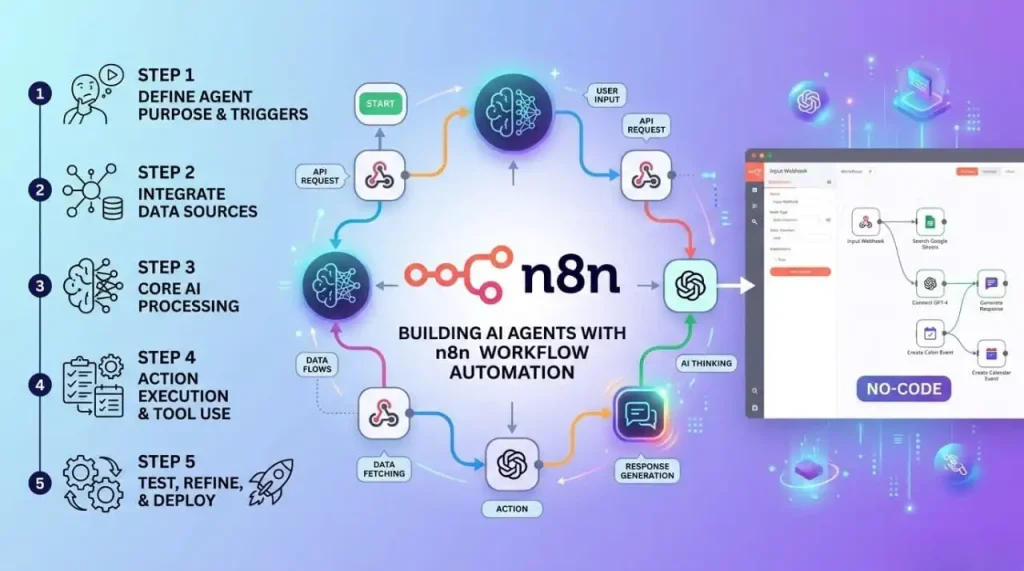
n8n is an extendable workflow automation tool. Like Zapier or Make, it allows you to connect different apps (Google Sheets, OpenAI, WordPress, Slack) to automate repetitive tasks.
However, n8n is unique because it is node-based. Instead of a simple list of steps, you build a visual map of your data’s journey. In 2026, it has become the preferred choice for AI developers because of its transparency and limitless customization.
2. Top 5 Advantages of Using n8n for AI Projects
A. Total Cost Control (Self-Hosting)
Most automation platforms charge you per “task.” If you automate 1,000 AI image generations, your bill can skyrocket to hundreds of dollars.
- The n8n Edge: You can host n8n on your own VPS (Virtual Private Server). You pay for the server (usually $5–$20/month), and you can run unlimited workflows. For a growing blog like AIWiner, this is a financial game-changer.
B. Deep Integration with AI APIs
n8n features native nodes for OpenAI, LangChain, and Hugging Face. This means connecting your workflow to GPT-Image 1.5 doesn’t require complex coding. You can send a prompt, receive an image, and upload it to your CMS in one fluid motion.
C. Data Privacy and Security
When you use cloud-based automators, your data passes through their servers. With n8n self-hosted, your API keys and sensitive customer data stay on your hardware. This is crucial for businesses handling proprietary information.
D. Advanced Logic & Error Handling
Standard tools often break if an API times out. n8n allows you to build Error Trigger nodes. If an image fails to generate, the system can automatically retry or notify you via Telegram, ensuring your “AI factory” never stops.
E. JavaScript Flexibility
For those who know a bit of code, n8n is a dream. You can use the “Code Node” to write custom JavaScript to transform data. Want to automatically add SEO keywords to your image filenames based on the prompt? n8n makes it easy.
3. Real-World Use Case: The AI Content Machine
How does a Pillar Post on n8n apply to your current GPT-Image 1.5 strategy? Here is a classic automated workflow:
- Trigger: A new keyword is added to a Google Sheet.
- AI Analysis: GPT-4o writes a blog post outline based on that keyword.
- Visual Creation: GPT-Image 1.5 generates a featured image for that post.
- Final Step: n8n pushes the text and image to WordPress as a draft and notifies the editor.
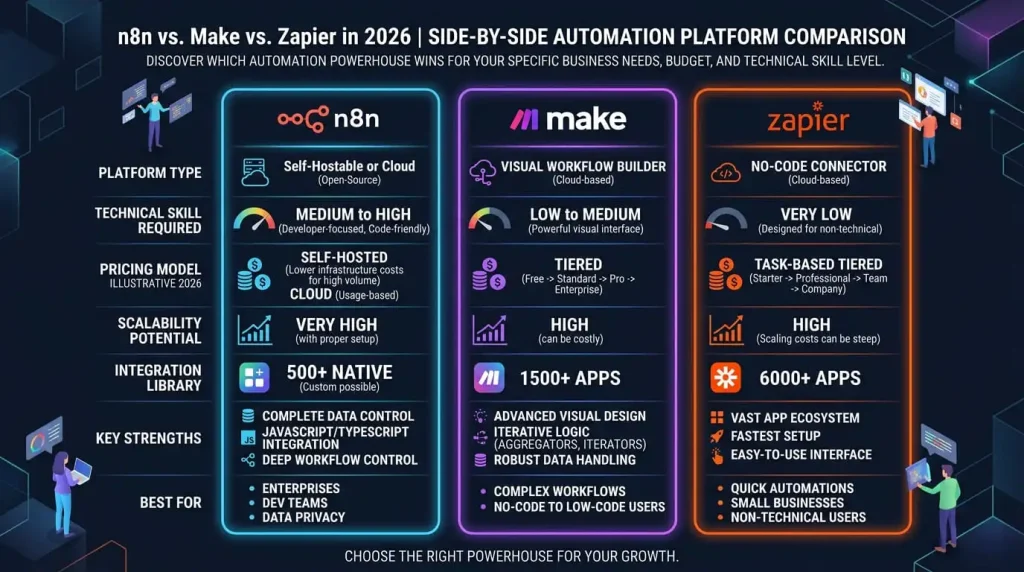
4. n8n vs. Zapier vs. Make: The 2026 Verdict
| Feature | Zapier | Make (formerly Integromat) | n8n |
| Ease of Use | High | Medium | Medium/High |
| Price | Expensive (per task) | Moderate | Lowest (Self-hosted) |
| Complexity | Simple | High | Infinite |
| Data Privacy | Cloud Only | Cloud Only | Self-Hosted / Private |
5. Conclusion: Is n8n Right for You?
If you are just starting and want to connect two apps once a week, stay with Zapier. But if you are building an AI-driven empire, scaling an e-commerce brand, or managing a network of blogs like aiwiner.com, n8n is the only logical choice. It offers the power of a custom-coded backend with the speed of a visual builder.
🔗 Internal Linking (Building the Cluster)
- Learn about the AI Engine: GPT-Image 1.5 vs Nano Banana Pro: The Full Comparison
- Master Graphic Edits: A Complete Guide to AI Inpainting
- Automation Basics: How to Scale AI Image Creation
Tutorial: Building an AI Image Factory with n8n and GPT-Image
One of the biggest challenges for website managers is creating custom illustrations for every blog post. Doing this manually is a time sink. Today, we’ll show you how to use n8n to automate this process 100%.
The Perfect Workflow: From Concept to Creative
With n8n, you can build a logical tunnel that works while you sleep. Here are the 4 key steps of the workflow we use at aiwiner.com:
1. The Trigger (Google Sheets or RSS)
The flow starts the moment you add a post title to a Google Sheet. n8n monitors this sheet and activates instantly when a new row is detected.
2. AI Prompt Engineering
The title is sent to an “OpenAI” node. The AI transforms your simple title into a highly detailed artistic prompt for GPT-Image 1.5.
- Example: “Post about coffee” becomes “Minimalist photography of a steaming blue coffee bean, professional lighting, 8k.”
3. Generation with GPT-Image 1.5
The optimized prompt is sent to the GPT-Image 1.5 API. n8n waits for the image to be ready, then retrieves the high-definition URL.
4. Storage and Notification
Finally, n8n downloads the image, renames it with your SEO keywords (e.g., best-coffee-2026.jpg), and uploads it to your WordPress media library or Google Drive. You then get a Slack notification: “Image ready for post X!”
Why n8n is the Superior Choice
The magic of n8n lies in the “HTTP Request” node. Unlike other platforms, n8n gives you total control over how you send data to the AI, allowing you to specify format, size, and even apply filters via other APIs before the final upload.
🔗 Liens Internes (SEO Maillage)
- The Main Guide: n8n: The Ultimate Guide to AI Automation
- The Engine: GPT-Image 1.5 vs Nano Banana Pro
Invisible SEO: How n8n Turns AI Images into Traffic Magnets
Creating a stunning visual with GPT-Image 1.5 is a creative win. But for a blogger or store owner, an image that doesn’t rank on Google Images is a wasted opportunity. The problem? AI typically generates raw files with zero technical optimization.
In this guide, we’ll explore how to use n8n to build an “SEO Pipeline” that processes your images from A to Z, ensuring they work for your rankings, not against them.
1. Dynamic Renaming: Goodbye “Untitled_1.png”
Google uses filenames to understand an image’s context. A file named ai-automation-n8n-workflow.webp will always outrank a generic one.
- The n8n Workflow: We use a “Code Node” to fetch your article’s H1 title, convert it into a “slug” (lowercase, no accents, hyphens only), and rename the image before it ever hits your server.
2. Computer Vision for Perfect Alt-Text
Alt-Text is the pillar of accessibility and SEO. Instead of filling it in manually, n8n connects your flow to a vision model (like GPT-4o).
- The Process: n8n “sees” the generated image, writes a factual description incorporating your keywords, and automatically injects it into your CMS database. This ensures 100% SEO compliance with zero manual effort.
3. Speed Optimization: The Automatic WebP Shift
Page speed is a major ranking factor (Core Web Vitals). AI-generated images are often heavy PNGs.
- The n8n Solution: Integrate an image conversion node (using tools like Cloudinary or local scripts) to transform every creation into WebP or AVIF. This reduces file size by up to 80% without losing visual quality.
4. Automated Metadata & Schema Markup
For advanced users, n8n can even generate JSON-LD Schema markup for your images. This tells Google the image is an original work, identifies the author (your brand), and clarifies usage rights—boosting your “E-E-A-T” (Experience, Expertise, Authoritativeness, and Trustworthiness).
🔗 Internal Linking (SEO Cluster)
- Pillar Guide: n8n: The Powerhouse of AI Automation
- Tech Comparison: GPT-Image 1.5 vs Nano Banana Pro
- Practical Steps: How to Build an Image Factory in n8n
Scaling Up: Why Self-Hosted n8n is the Most Cost-Effective Choice
If you’ve used Zapier or Make, you know the “Success Tax.” The more you automate, the more you pay. For a high-growth platform like aiwiner.com, scaling content production with GPT-Image 1.5 can quickly lead to monthly automation bills in the hundreds, or even thousands, of dollars.
This is where Self-hosting n8n becomes your ultimate competitive advantage, turning your variable automation expenses into a tiny, predictable fixed cost.
1. Escaping the “Task” Price Trap
Traditional cloud automation platforms charge you per execution.
- A typical AI image workflow looks like this: Trigger > AI Prompt Crafting > Image Generation > Resizing > WordPress Upload.
- That’s 5 tasks per image. If you aim for 1,000 images a month, you are already into expensive enterprise territory.
- The n8n Edge: By hosting n8n on your own VPS (Virtual Private Server), the cost for 1,000 tasks is exactly the same as 1,000,000 tasks. You only pay for the server hardware.
2. Infrastructure Control with Docker & VPS
Running n8n via Docker on a private server gives you “god mode” over your infrastructure.
- Performance: You can scale your server’s RAM and CPU to handle massive bursts of AI image generations during a marketing campaign.
- Stability: Your automation environment is isolated. If a third-party cloud service goes down, your internal workflows and data processing stay active and secure.
3. Bulletproof API Key Security
When you use a third-party cloud automator, your most sensitive credentials (OpenAI API keys, Database passwords) live on their servers. With a self-hosted n8n instance, your keys never leave your environment. In an era where API account hijacking can lead to thousands of dollars in fraudulent usage, keeping your keys “in-house” is the only professional way to scale.
4. The “Responsibility” Factor: Maintenance & Backups
Self-hosting isn’t just about saving money; it’s about ownership. You are responsible for your uptime and backups.
- Pro Tip: n8n makes this easy. You can build a meta-workflow that exports all your automation logic as JSON files and pushes them to a private GitHub repository every night. This ensures that even if your server crashes, your entire “AI Factory” can be rebuilt in minutes.
🔗 Internal Linking (SEO Cluster)
- The Foundation: n8n: The Ultimate Guide to AI Automation
- The Creative Engine: GPT-Image 1.5 vs Nano Banana Pro
- Practical Guide: Automating Your Image SEO with n8n
Beyond Simple Tasks: Building Multi-Agent AI Systems with n8n
Simple linear automation (Step A to Step B) is no longer enough to stay competitive. In 2026, the true power of AI lies in decisional workflows. Instead of just triggering an image generation, we are going to explore how to use n8n to build a “Virtual Creative Agency” that can think, critique, and self-correct.
1. Understanding Multi-Agent Orchestration
In a standard setup, you send a prompt and hope for the best. In a multi-agent system built with n8n, different AI roles collaborate to ensure quality:
- The Creative Agent: Drafts the complex prompt for GPT-Image 1.5 based on your article’s keywords.
- The Critic Agent: Uses Computer Vision to analyze the generated output against your brand guidelines.
- The Refiner Agent: If the Critic finds a flaw (e.g., “colors are too dark”), the Refiner adjusts the prompt and triggers a new generation cycle.
2. Conditional Logic: The “IF” Node as a Brain
The “IF” node is the most transformative tool in the n8n arsenal. It allows for complex branching logic based on real-time data.
- Use Case: Imagine automating social media for an E-commerce brand.
- IF the product category is “Electronics,” THEN n8n directs GPT-Image 1.5 to use a “Futuristic/Neon” aesthetic.
- IF the category is “Organic Food,” THEN it switches to a “Natural/Bright/Soft-Focus” style. This ensures your visual output is always contextually accurate without you ever lifting a finger.
3. Mastering Feedback Loops and Error Handling
High-fidelity image generation (especially 8K or complex compositions) can take time. Most automation tools will “time out” and fail if an API takes longer than 30 seconds. n8n handles this with Polling Loops:
- The workflow sends the request.
- It enters a “Wait” state.
- Every 10 seconds, it checks the status.
- Once the image is 100% ready, it proceeds to the next node. This makes your automation “bulletproof.”
4. Human-in-the-Loop: The Hybrid Power
For high-stakes projects, you might not want 100% autonomy. n8n allows for “Human-in-the-loop” nodes. The system can generate three different concepts, send them to your Slack or Telegram as a gallery with interactive buttons, and wait for your click. Once you select the winner, n8n automatically handles the resizing, SEO optimization, and final publishing.